
PayPal Business
PayPal MobileBusiness
3.89.76K Reviews
- Version
- 2025.04.24
- Installs
- 10.00M
- Age Rating
- Everyone
Screenshots
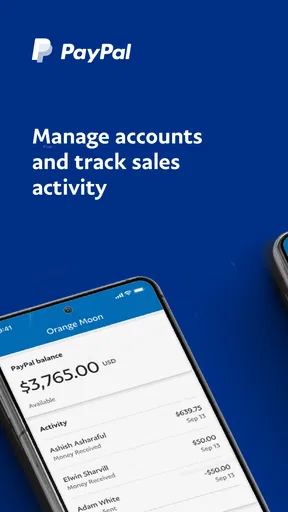
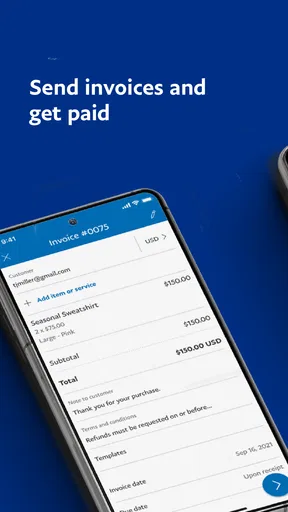
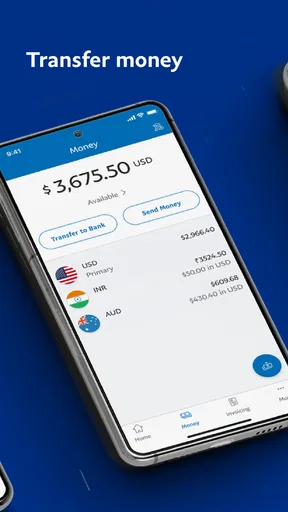
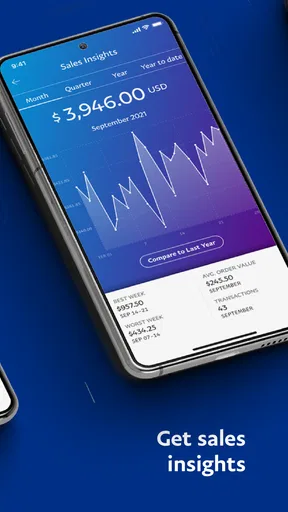
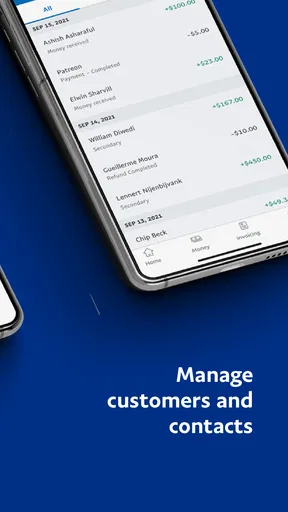
Our Review of PayPal Business
 Analysis by Appyee
I use PayPal Business as a mobile companion for the less glamorous side of running a small business: requesting payment, checking activity, and keeping customer transactions moving while I am away from a desk. It is a free business app from PayPal Mobile, aimed at people who already rely on PayPal and want business-related tasks in a phone-friendly format rather than through a full desktop workflow.
That distinction matters. This is not a general accounting package, a complete point-of-sale system, or a replacement for every tool a growing company may need. Its appeal is narrower and more practical: it puts invoicing and business payment management in one place. In my experience, that makes it useful for freelancers, independent sellers, consultants, and small teams that value quick access more than a deep back-office suite.
How PayPal Business fits into everyday work
The app belongs to the business category, and its focus is easy to understand once I look at the main job it is designed to handle. I can prepare invoices, send them to customers, and keep an eye on business activity from a mobile device. That is especially convenient when work happens in different locations, when a customer asks for an invoice immediately, or when I need to check whether a payment-related task still needs attention.
Rather than treating the phone as a miniature office with every possible business function, PayPal Business keeps the experience centered on PayPal’s payment environment. That can be a strength because there is less to learn than in a broad financial management platform. It can also be a limitation if I need detailed stock control, advanced bookkeeping, staff permissions, or a complete sales register.
The application has been available since late 2016, and the current version is 2025.04.24. It works on Android devices running version 6.0 or later, which gives it a broad technical reach for people using older compatible phones. The content rating is Everyone, so the app is presented as a general business utility rather than something restricted by age.
Its scale is also reassuring for users who prefer established services: it has passed ten million installs and carries a 3.8 average from roughly one hundred nine thousand ratings, alongside about nine thousand eight hundred written reviews. Those figures do not guarantee that every user will enjoy the experience, but they do show that this is a widely used app rather than an obscure experiment.
What the free price really means
There is no purchase price to download the app. I see that as a meaningful advantage for someone testing a mobile business workflow, because I can install it without committing to a subscription or buying a separate invoicing tool first. The free access makes the initial decision straightforward: the question is less “can I afford the app?” and more “does PayPal’s business workflow suit the way I already collect money?”
That is an important difference when judging value. The app itself is free, but using a payment service can involve service terms and transaction costs outside the download price. I would therefore avoid treating the app as a promise of cost-free payment processing. Its value comes from access to business functions on a phone; the financial outcome of receiving money depends on the PayPal arrangement and transaction involved.
For a new freelancer, free access can remove a barrier. I can start with a familiar payment route, send a professional request, and see activity without purchasing a larger business platform. For an established company, however, the absence of an app price does not automatically make it the cheapest overall option. A tool with a monthly fee might still be better value if it replaces bookkeeping, inventory, customer records, and payment reconciliation in one system.
A realistic invoice workflow
Imagine I finish a logo project for a local client while I am travelling home. The client asks for the invoice that evening, not tomorrow when I am back at my computer. With PayPal Business, the useful part is being able to handle that request from the phone instead of postponing it. I can prepare the payment request while the details are fresh, send it, and later check the account activity without opening a separate desktop application.
That small reduction in delay can matter more than it sounds. Independent workers often lose time not because invoicing is complicated, but because it gets pushed behind client work. A mobile-first option makes it easier to complete the task at the moment it arises. I find this particularly valuable for one-off projects, deposits, small service jobs, and customers who are already comfortable paying through PayPal.
My practical advice is to prepare the information before starting: the customer’s details, a clear description of the work, the amount, and any payment expectations. Mobile screens encourage quick entry, but rushing an invoice can create avoidable corrections. A short, specific description is also more useful than a vague label when I later review business activity.
Where the app saves time
The strongest benefit is continuity. I do not have to wait until I reach a laptop to deal with a basic business payment task. That is useful for tradespeople, photographers, tutors, repair specialists, and other independent workers whose day is spent away from a desk. The app also suits a small operation where one person handles customer communication, invoicing, and payment checks.
Another practical advantage is separation. A business-focused PayPal app is more appropriate for work-related transactions than mixing every task into a personal payment routine. Even if the business is only one person, keeping attention on invoices and business activity can make it easier to review what happened during a workday.
I would still treat the app as one part of a process. After sending an invoice, I would keep a separate record of the sale, the customer, the service delivered, and any tax information I need. The application can support payment administration, but it should not be mistaken for a complete accounting record unless it fits the specific requirements of my business and local obligations.
Useful habits that improve the experience
One overlooked benefit of mobile invoicing is timing. I can create a request immediately after agreeing on a job, rather than relying on memory at the end of the week. That reduces the chance of forgetting a small payment or sending an invoice with an outdated amount. For recurring freelance work, I would also use a consistent naming style in descriptions so that later activity reviews are easier to understand.
I would make a second habit of checking the activity view after important customer payments rather than assuming that a message or customer screenshot tells the whole story. A payment conversation and a payment record are not the same thing. Confirming the relevant activity inside the business account gives me a better operational checkpoint before marking an order or service as complete.
A third useful trade-off is deciding when not to work from the phone. Mobile access is excellent for a quick invoice or status check, but a long list of customers or a complicated set of line items is easier to review on a larger screen. I would use the app for speed and responsiveness, then move to a broader desktop process when accuracy requires more space and supporting records.
How it compares with usual alternatives
Compared with sending a plain payment message, PayPal Business gives the task a more business-oriented structure. A casual request may be enough for a friend, but a client usually benefits from a clearer invoice and a more deliberate payment process. The app is therefore a better fit when I want to turn an informal request into a recognizable business transaction.
Compared with a bank transfer, the choice depends on the customer and the type of work. A bank transfer may be more natural for certain local clients or larger invoices, while PayPal can be more convenient when the customer already uses it. I would not choose the app solely because it is on my phone; I would choose it when the customer’s preferred payment route and my own business setup make PayPal practical.
Compared with a full invoicing or accounting platform, the trade-off is depth versus immediacy. A dedicated platform may provide stronger reporting, expense tracking, tax workflows, inventory, recurring billing, or team controls. PayPal Business is more attractive when the central need is handling PayPal-related business payments quickly. If I need a complete financial command center, I would look beyond this app and use it only as one payment channel.
Where friction can appear
The 3.8 average rating suggests a mixed experience, and I think that is understandable for an app tied to important financial tasks. A business user may judge every login, loading delay, confusing screen, or unclear status more harshly than someone using a casual social app. When an invoice or payment needs attention, even a small amount of friction feels significant.
The mobile format can also become restrictive. A phone is convenient for a single invoice, but less comfortable for reviewing many transactions, comparing periods, or correcting detailed information. I would not want to manage a large catalogue of customers entirely from a small screen. The app’s convenience is strongest when the task is focused and immediate, not when the work becomes administrative and repetitive.
There is also a strategic limitation in depending too heavily on one payment ecosystem. If customers prefer cards, bank transfers, another wallet, or purchase orders, PayPal Business may not cover every situation equally well. A business that serves different customer types may need additional payment options and a separate record-keeping system. The free download does not remove that operational complexity.
Security deserves practical attention as well. Because the app concerns business money, I would protect the phone, use a strong account password, and avoid treating a quick mobile session casually. I would also review recipients and invoice details before sending. These are simple habits, but speed is only useful when it does not lead to an incorrect request or an avoidable account problem.
Who will get the most value
I think the best audience is a solo professional or very small business that already uses PayPal and wants a convenient way to send invoices and monitor activity. Freelancers, consultants, tutors, designers, independent contractors, and small online sellers can benefit because their payment workflow is often straightforward and handled by one person.
It is also a sensible starting point for someone who does not want to pay for a separate business app before understanding how much structure they actually need. Free access lets that person test a mobile routine, learn whether customers respond well to PayPal invoices, and decide later whether a broader platform is justified.
The app is less suitable for a company with several employees approving invoices, a large product catalogue, complex inventory, detailed project accounting, or demanding tax and reporting requirements. In those cases, I would prioritize a system built around the entire business rather than selecting a payment app as the main operating tool.
I would also hesitate if most customers do not use PayPal or if the business depends on payment methods that are better supported elsewhere. The app can still be useful as one option, but it may not deserve to be the center of the workflow. Choosing it simply because it is free could create extra reconciliation work later.
My buy-or-skip verdict
Since the app is free, my verdict is really a use-or-skip decision. I would use PayPal Business if I wanted mobile access to invoices and PayPal business activity, especially as a freelancer or small operator who values quick action away from a desk. The combination of an established developer, broad device compatibility, and a focused purpose makes it easy to try without a purchase commitment.
I would skip it as my primary business system if I needed full accounting, inventory, detailed reporting, or a multi-person approval process. In that situation, a dedicated business platform would probably deliver more value even if it had a separate cost. I would also skip it if PayPal was not a natural payment choice for my customers.
Overall, I see PayPal Business as a practical mobile layer for a PayPal-centered operation, not a universal answer to business administration. Its best quality is immediacy: I can deal with a payment task when it happens instead of waiting for a computer. Its main weakness is scope: once the business becomes more complex, the app needs support from broader tools.
For the right user, that balance is worthwhile. A solo worker who wants to send a clean invoice after finishing a job, check activity during a busy day, and avoid paying for another app can get genuine value from it. A growing company should judge it more carefully, keeping the free access in perspective and asking whether convenience is enough for the records and controls the business actually needs.
Verdict
Strengths of PayPal Business
- Manage invoices, payments, and refunds from your phone
- Supports multiple currencies for international business transactions
- Transaction notifications help you track incoming payments quickly
- Offers seller protection on eligible transactions
- Easy integration with online stores and payment platforms
Limitations of PayPal Business
- Business transaction fees can reduce profits, especially for small sellers
- Funds may be held temporarily during reviews or disputes
- Customer support quality can vary depending on the issue
- Some advanced features require access through the web dashboard
- Account limitations may interrupt payments without much warning
Other Releases by PayPal Mobile
View All
PayPal - Pay, Send, Save
Finance4.2
Similar Picks in This Category
View All
LinkedIn: Community & Network
LinkedIn3.8

Zoom Workplace
zoom.com4.1

Microsoft Teams
Microsoft Corporation4.6

Meta Business Suite
Meta Platforms, Inc.4.6

Webex Meetings
Cisco Systems, Inc.4.5

TeamViewer Remote Control
TeamViewer4.4
Frequently Asked Questions
What is PayPal Business, and who is it designed for?
PayPal Business is a payment and account-management solution for freelancers, online sellers, small businesses, and larger merchants. It allows you to accept payments, send invoices, request money, issue refunds, review transactions, and manage business activity from a mobile device. During testing, the app felt most useful for users who already have a PayPal Business account or need a convenient way to monitor payments while away from a desktop.
Can I accept payments through PayPal Business without owning a website?
Yes, PayPal Business can support payment collection even if you do not operate a traditional website. Depending on your country and account eligibility, you may send payment requests or invoices, share payment links, and use available checkout tools. However, features differ by region, business type, and account status. Before downloading, check which payment methods and merchant tools are supported where your business is registered.
Are there fees for using PayPal Business?
PayPal Business itself may be free to download, but using its payment services can involve transaction fees, currency-conversion charges, withdrawals, chargebacks, or other costs. The exact amount depends on your country, payment method, transaction type, and account agreement. I recommend reviewing PayPal’s current fee schedule before accepting payments, especially if you sell internationally or process many small transactions.
Is PayPal Business safe for managing company payments?
PayPal Business includes security features such as account authentication, transaction monitoring, notifications, and tools for reviewing disputes or unauthorized activity. In my experience, the app makes it easy to check incoming payments and identify unusual account activity quickly. Nevertheless, security also depends on the user: enable two-step verification, use a unique password, avoid suspicious links, and never share login or verification codes.
What should I know about withdrawals, refunds, and customer disputes?
PayPal Business provides tools for sending refunds, viewing transaction details, responding to disputes, and transferring eligible funds to a linked bank account or card. Processing times and availability vary by country, financial institution, currency, and account history. Some payments may be temporarily held or reviewed, so businesses should not assume every received payment is immediately withdrawable or completely risk-free.
